Phishing is a message that pretends to be from someone you trust, to get your password, your money or a way into your computer. If you clicked a link or typed a password and now aren't sure, call us on (206) 593-8072. The sooner, the better.
| Your plan | What applies to you |
|---|---|
| Managed plan | All of this page. If you clicked, call us and we check your account and computer with you. |
| Ordered online (self-serve) | All of this page. We answer Monday to Friday, 8:00 AM to 6:00 PM Pacific Time. For a security emergency, call. |
¶ Part 1: Spotting phishing
Phishing arrives by email, text message, phone call, and QR code. Good spelling and grammar no longer prove a message is real: scammers now use AI to write clean text.
¶ Signs of phishing
| Sign | What to look for |
|---|---|
| The sender | The name looks right but the email address doesn't, or the address doesn't match the signature |
| A lookalike address | One letter changed or added, such as micros0ft.com or rainler-it.com |
| Links | The address you see when you check the link isn't the company's own site, or it's a shortened link |
| Urgency or fear | "Your account will be closed today", "Payment overdue", "Unusual sign-in detected" |
| Requests for information | A password, a sign-in code, card or bank details, or a Social Security number |
| Unexpected attachments | An invoice, shipping notice or "shared document" you weren't expecting |
| Requests to change settings | An attachment that asks you to "enable editing", "enable content" or install something |
| A QR code in an email or text | A code you're asked to scan to sign in, pay, or fix a delivery |
| Sign-in approvals you didn't start | Your phone keeps asking you to approve a sign-in, again and again |
| A generic greeting | "Dear customer" or "Hello user", or your name taken from your email address |
| Secrecy | "Don't tell anyone", or "I'm in a meeting, just do this" |
¶ Check a link before you open it
- On a computer, rest the mouse pointer on the link without clicking. The real address appears, usually at the bottom of the window or in a small box.
- On an iPhone in Safari, touch and hold the link to see a preview without opening the page. Tap outside the preview to close it.
- Read the address from the right. In
https://rainier-it.com.account-check.example/login, the real site isaccount-check.example, not rainier-it.com.
If the address doesn't match the company, don't open it. If you're not sure, go to the company's site by typing the address yourself.
¶ QR codes
Treat a QR code in an email or text like a link. Don't scan one you weren't expecting, especially one that asks you to sign in or pay. If your phone shows the address before opening it, check it for misspellings or swapped letters.
¶ Sign-in approvals you didn't start
If your phone asks you to approve a sign-in and you aren't signing in, someone else is using your password.
- Select Deny, or don't respond. Never approve it to make the prompts stop.
- Call us on (206) 593-8072. Your password needs changing.
Attackers who already have your password send prompt after prompt, hoping you approve one by accident or just to make them stop. CISA calls this "MFA fatigue".
¶ Phone calls and texts
A call or text can be phishing too. Caller ID can be faked. If a caller asks for a password, a code, payment or remote access, hang up and call the company on a number you already know. If the caller claims to be us, see How to tell it's really us.
¶ Part 2: If you clicked a link or entered your password
Don't be embarrassed. Phishing is designed to fool busy people, and the first few minutes matter most.
¶ The first 10 minutes
- Stop. Don't type anything more into the page, and close it.
- If something downloaded or started installing, unplug the network cable or turn off Wi-Fi, and leave the computer on.
- If you entered a password, change it from a different computer or phone you trust. Type the site's address yourself, or use its app. Don't use any link in the message.
- If you used the same password anywhere else, change it there too.
- Check your account's recent sign-in activity for sign-ins you don't recognize (see below).
- Call us on (206) 593-8072. Tell us what you clicked, what you entered, and when.
You'll know you've done enough for now when your password is changed and you've reached us or left a message with your name, company, a callback number and what happened.
Why change it from another device? If the link put something on your computer, it may be able to see what you type there.
If you entered your Rainier IT sign-in, see Password management to change it, and tell us so we can review recent sign-ins to your account.
¶ Review recent sign-in activity
| Account | Where to look |
|---|---|
| Microsoft 365 work or school account | Go to myaccount.microsoft.com and select Recent activity |
| Google account | Go to myaccount.google.com, open Security & sign-in, then under Your devices select Manage all devices |
A sign-in from a place you've never been may be someone else. Some locations are only rough guesses from the network, so a phone on a mobile network can show a distant city. Tell us what you see and we check it with you.
¶ If you entered card or bank details
Call your bank or card company straight away, using the number on the back of your card. Ask them to block the card and watch for charges. If you gave your Social Security number, follow the plan at IdentityTheft.gov.
¶ If you opened an attachment
Follow I think my PC got infected: disconnect the computer from the network, leave it on, and call us.
¶ Report phishing
Reporting helps your email provider block the same message for everyone. Report it in your email app, then delete it.
¶ Outlook
On a work or school Microsoft 365 account, in current Outlook (new Outlook for Windows, Outlook on the web, and up-to-date Outlook for Microsoft 365 and Mac):
- Select the message in your inbox.
- Select Report.
- Select Report phishing.
On the Outlook phone app:
- Open the message.
- Tap the three-dot menu at the top right.
- Tap Report Junk.
- Tap Phishing.
You'll know it worked when the message disappears from your inbox. Outlook removes messages you report as phishing.
If you can't see a Report button, ask us. Older versions of Outlook and some company settings show it differently. Microsoft's own steps are in Phishing and suspicious behavior in Outlook.
¶ Gmail
On a computer:
- Open the message.
- Next to Reply, click More.
- Click Report phishing.
In the Gmail phone app, open the message, tap More at the top right, then tap Report spam. Gmail's own steps are in Avoid and report phishing emails.
If you report a real email by mistake, follow the same steps and choose Report not phishing.
¶ Tell us too
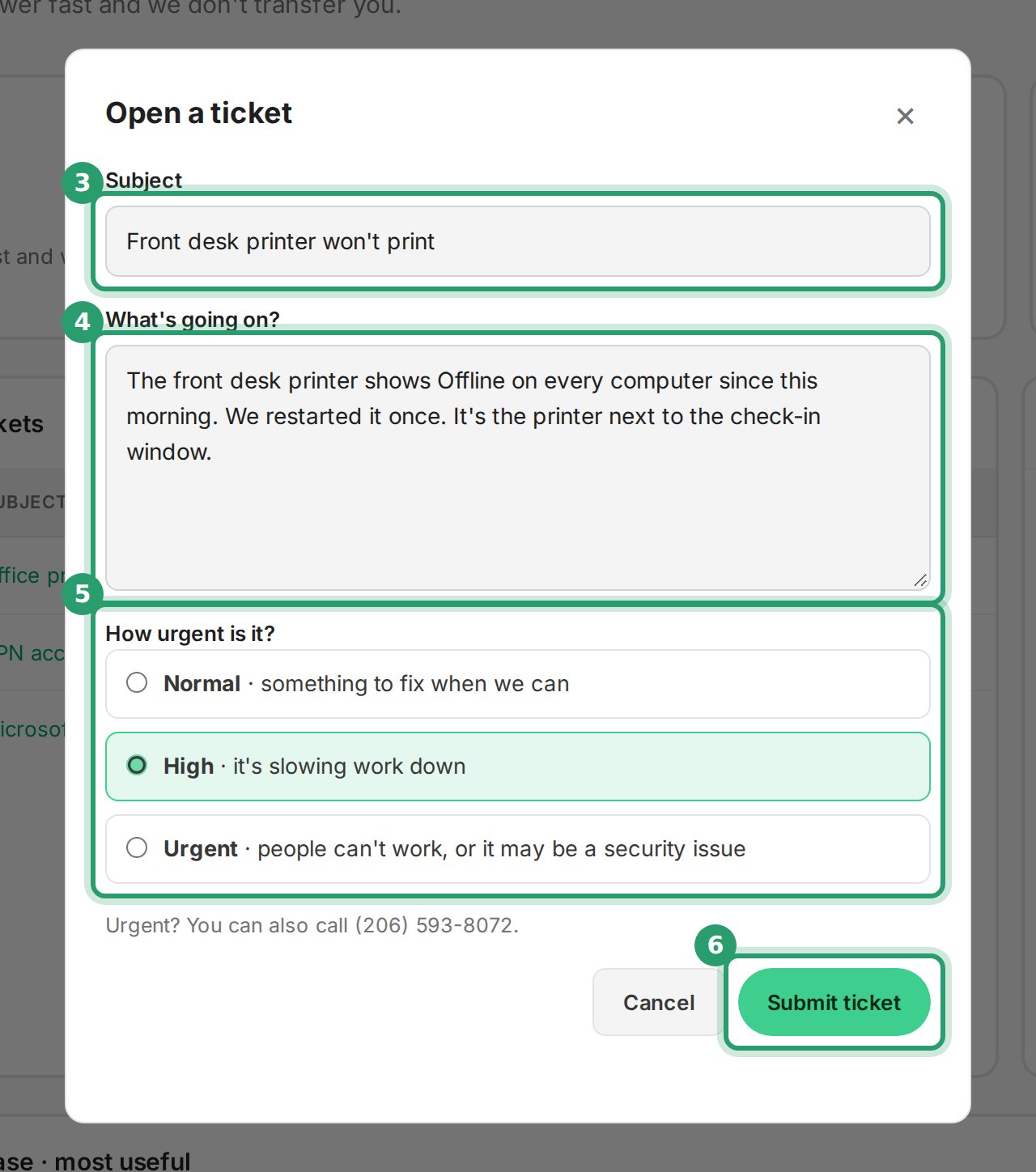
If the message pretends to be from us, from your own company, or from someone you work with, tell us before you delete it. Open a ticket in the Client Portal or email [email protected], and say what the message was about and who it seemed to come from.
In the ticket, say what the message claimed to be and when it arrived:
Don't forward a phishing message to colleagues to ask whether it's real. They may click it.
¶ Texts
Forward a phishing text to 7726 (SPAM), then delete it.
¶ Get help
| Phone, urgent | (206) 593-8072 |
| [email protected] | |
| Client Portal | portal.rainier-it.com |
| Hours | Monday to Friday, 8:00 AM to 6:00 PM Pacific Time. Outside those hours, call and leave a message |
¶ Sources
- Recognize and Report Phishing, CISA (archived page): urgent or emotional language, requests for personal information, shortened links, lookalike addresses; AI means good grammar proves nothing; report with your email app's report button.
- Teach Employees to Avoid Phishing, CISA: hover over a link to see where it leads; don't use numbers or links in the message; messages may come from a known contact's hacked account; change passwords; report and delete.
- Implementing Number Matching in MFA Applications, CISA (October 2022): "MFA fatigue", or push bombing; attackers who have the password send prompts until one is approved.
- Avoiding Social Engineering and Phishing Attacks, CISA (archived, released February 2021): phishing by phone and text; caller ID can be spoofed; change any password you revealed.
- How To Recognize and Avoid Phishing Scams, FTC Consumer Advice (September 2022): common phishing stories; contact the company on a number or site you know; forward texts to SPAM (7726); IdentityTheft.gov.
- Scammers hide harmful links in QR codes, FTC Consumer Alert (December 6, 2023): don't scan QR codes in unexpected emails or texts; inspect the address first.
- What To Do if You Were Scammed, FTC Consumer Advice (June 2026): change a password you gave away and anywhere it was reused; card and bank steps.
- How to protect against phishing attacks, Microsoft Learn (updated August 2026): links that don't point where they say, changed letters or numbers in addresses, sender not matching the signature, attachments that ask you to enable macros or install apps; contact IT and change passwords if you're a victim.
- Report phishing and suspicious emails in Outlook, Microsoft Learn (July 2026): the built-in Report button and Report phishing in supported Outlook versions; messages reported as phishing are deleted; the button depends on company settings.
- How do I report phishing or junk email?, Microsoft Support: Outlook phone app steps.
- Phishing and suspicious behavior in Outlook, Microsoft Support: Report, then Report phishing, in Outlook on the web.
- View your work or school account sign-in activity, Microsoft Support: Recent activity in My Account; locations are estimates.
- Avoid and report phishing emails, Gmail Help: Report phishing and Report not phishing on a computer; hover over links; check the sender's name and address.
- Report spam in Gmail, Gmail Help (Android, and the iPhone and iPad version of the same page): More, then Report spam, in the phone app.
- See devices with account access, Google Account Help: Manage all devices.
- Browse the web using Safari on iPhone, Apple Support: touch and hold a link to preview it without opening the page.
Last reviewed: October 2026