

On managed plans we keep your computers up to date for you, in a window you choose, so restarts don't land in the middle of your working day. If you ordered Action1 Patch Management on our website, its guide is listed on Start here for self-serve clients instead.
¶ What we patch
| Area | Examples |
|---|---|
| Windows | Monthly security and critical updates |
| Common apps | Browsers, Adobe Reader, Zoom, 7-Zip and more than 200 other common Windows apps, where your plan includes app updates |
| Feature upgrades | Moving to a new version of Windows. Scheduled with you, never automatic |
| Drivers | Not automatic. We install them one at a time when needed |
We patch with Action1, which runs separately from Windows Update. It shows us which computers are behind and which updates failed, and lets us schedule them. We agree with you whether your plan covers Windows only, or Windows and apps.
¶ When updates install
Updates install automatically in your update window, after a short waiting period:
- Windows security and critical updates wait 5 days after release.
- App updates wait 2 days.
- When a flaw is known to be used by attackers right now (it is on CISA's Known Exploited Vulnerabilities list), we install the fix the same day and email you. These urgent fixes never force a restart.
The waiting period lets us hold back an update if other organisations report problems with it.
Computers that are off during the window install the updates the next time they're on, for up to 6 days.
Big Windows upgrades, such as moving to a new Windows 11 version, are never pushed automatically. We schedule them with you, because they can change how Windows looks and works.
¶ Your update window and restarts
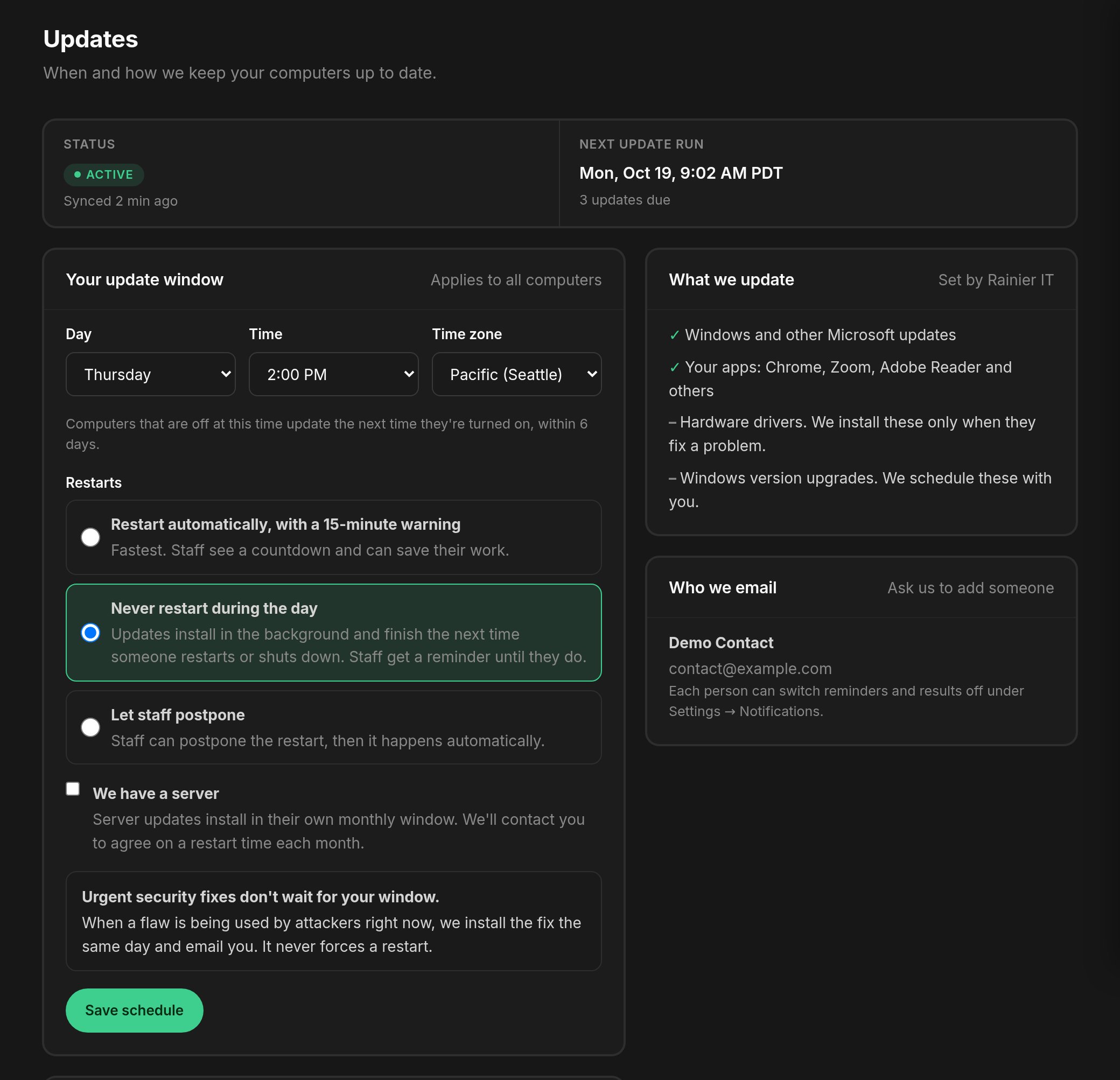
Open Updates in the Client Portal to see and change your update window: the day, time and time zone. Under Restarts you choose how computers restart when an update needs it:
- restart automatically, with a 15-minute warning;
- never restart during the day;
- let staff postpone the restart.
If your business works overnight, for example a call centre or a care provider, pick a window that suits your quiet hours.
If one person can't have their computer restart for a while, such as during a quarter-end close, open a ticket naming the person and the dates, and we hold their restarts.
Updates also shows how many updates are due, the next update run, and what was installed in recent runs. Devices shows the pending updates for each computer.
We email a heads-up the day before updates. We don't email the results: they're under Recent update runs on the Updates page. Each person can switch the heads-up off under Settings, then Notifications.
When we publish a Threat Watch brief, you read it on the Updates page too. It's our short weekly note on security threats, and we review each one before it reaches you.
¶ Servers
Servers install updates in their own monthly window, and the restart is never automatic. We open a ticket each month to agree the restart time with you.
¶ Why a computer restarted overnight
Usually one of these:
- Windows Update forced a restart because an update had been waiting too long. Microsoft sets this, and we can't always stop it.
- Your restart setting allowed an automatic restart after an update in your window.
- A planned restart, because the computer had run for 60 days or more without one. Long uptimes are a common cause of slowdowns.
- A power event: a storm, a failed battery backup, or someone unplugged it. Look in Event Viewer under the System log for an unexpected shutdown.
If you see odd restarts more than once, open a ticket. We read the event logs and tell you what caused them.
¶ Our targets
- Every computer patched within 7 days of an update's release.
- No computer missing a fix for a critical flaw (CVSS 9 or higher) more than 72 hours after release.
¶ What we don't update automatically
- Line-of-business software, such as your accounting package or industry tools. These need coordinating with the vendor. Open a ticket with the upgrade request.
- Software written for your business. Same as above.
- Drivers. Only drivers certified by Microsoft (WHQL) are installed, and we do them one at a time.
- BIOS and firmware updates. A power cut during one can leave a computer unable to start, so we schedule each one, with the user present where possible.
¶ Common questions
¶ Updates breaking an app
It is rare, but it happens: Microsoft sometimes ships an update that clashes with a particular app. When we see that, we stop the rollout and work with the vendor. A Windows update can be uninstalled from Settings, Windows Update, Update history, and we can help.
¶ Skipping one update
Open a ticket, for example: "Please skip KB5001234 on my computer; it breaks our ERP."
¶ Turning off automatic updates
We strongly advise against it. Missing updates are the most common way in for the ransomware incidents we see. If you insist, we respect it and record it in writing. Problems caused by updates you asked us not to install are billed differently from problems within your plan.
¶ Get help
| [email protected] | |
| Phone | (206) 593-8072 |
| Client Portal | portal.rainier-it.com |
¶ Sources
- Known Exploited Vulnerabilities catalog, CISA
- Common Vulnerability Scoring System, FIRST
- Third-party app patch repository, Action1
- Updates deployment and reboot behavior on Windows, Action1 documentation
- Action1 Patch Management: 200+ third-party Windows apps, Rainier IT security services
Last reviewed: November 2026