A good ticket gets the right person on the right problem without back-and-forth. This page shows the three ways to open one and what to put in it.
| Your plan | What applies to you |
|---|---|
| Managed plan | Use the portal, email or phone. All three open a ticket in the same place. |
| Ordered online (self-serve) | The same three ways. We answer Monday to Friday, 8:00 AM to 6:00 PM Pacific Time. For an emergency, call. |
We never ask for your password by email or phone. Real links go only to sso.rainier-it.com or portal.rainier-it.com. If in doubt, call (206) 593-8072.
¶ Pick a channel
| Channel | Best for |
|---|---|
| The Client Portal | Opening a ticket and following every reply in one place |
| Email [email protected] | Sending screenshots or files with your request |
| Phone (206) 593-8072 | Urgent problems: people can't work, or it may be a security issue |
¶ Open a ticket in the portal
Sign in at portal.rainier-it.com first.
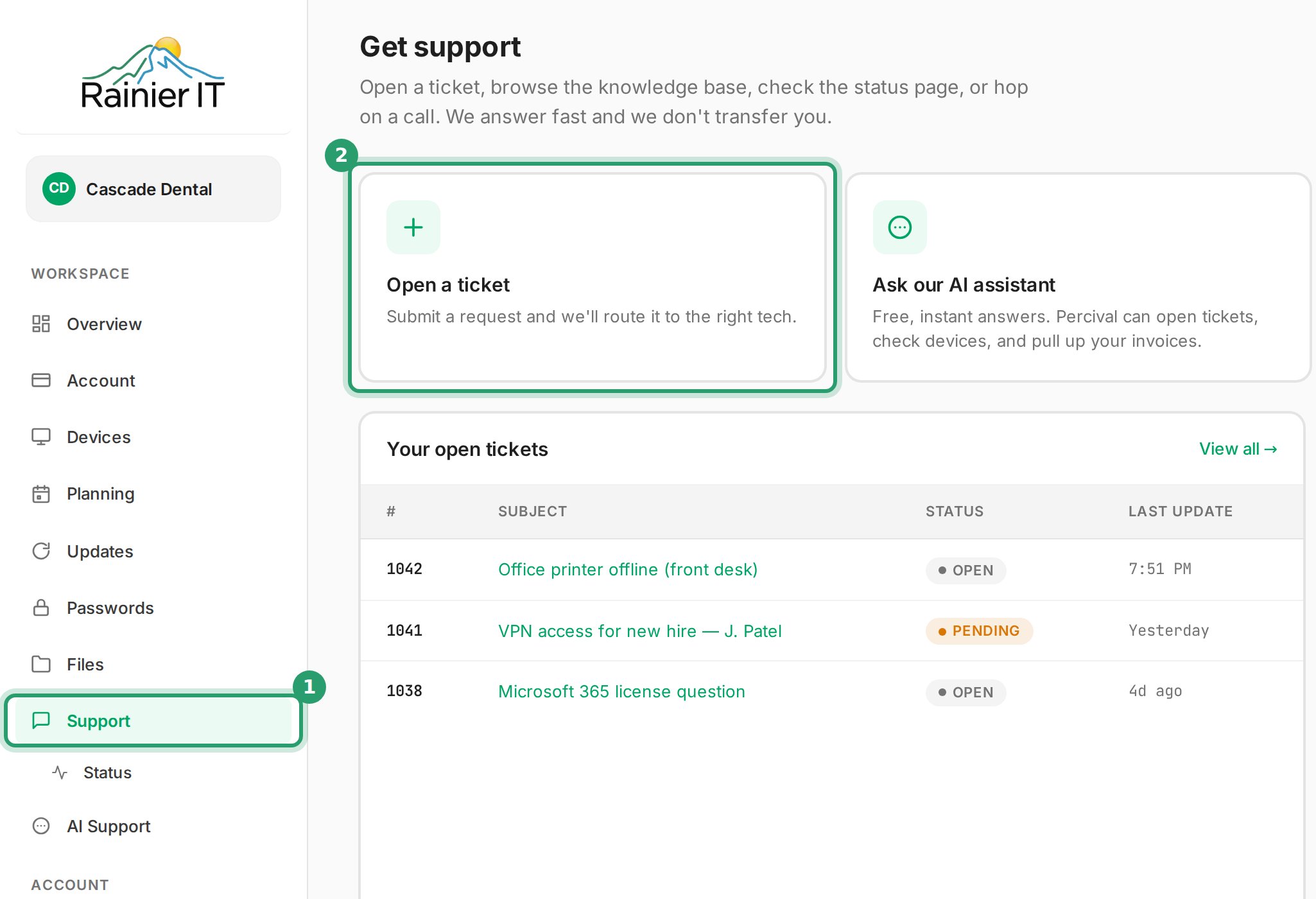
- Select Support in the menu.
- Select Open a ticket.
- Type a short summary in Subject, such as "Front desk printer won't print".
- Describe the problem in What's going on?: what happened, which computer, and what you already tried.
- Choose an answer under How urgent is it?.
- Select Submit ticket.
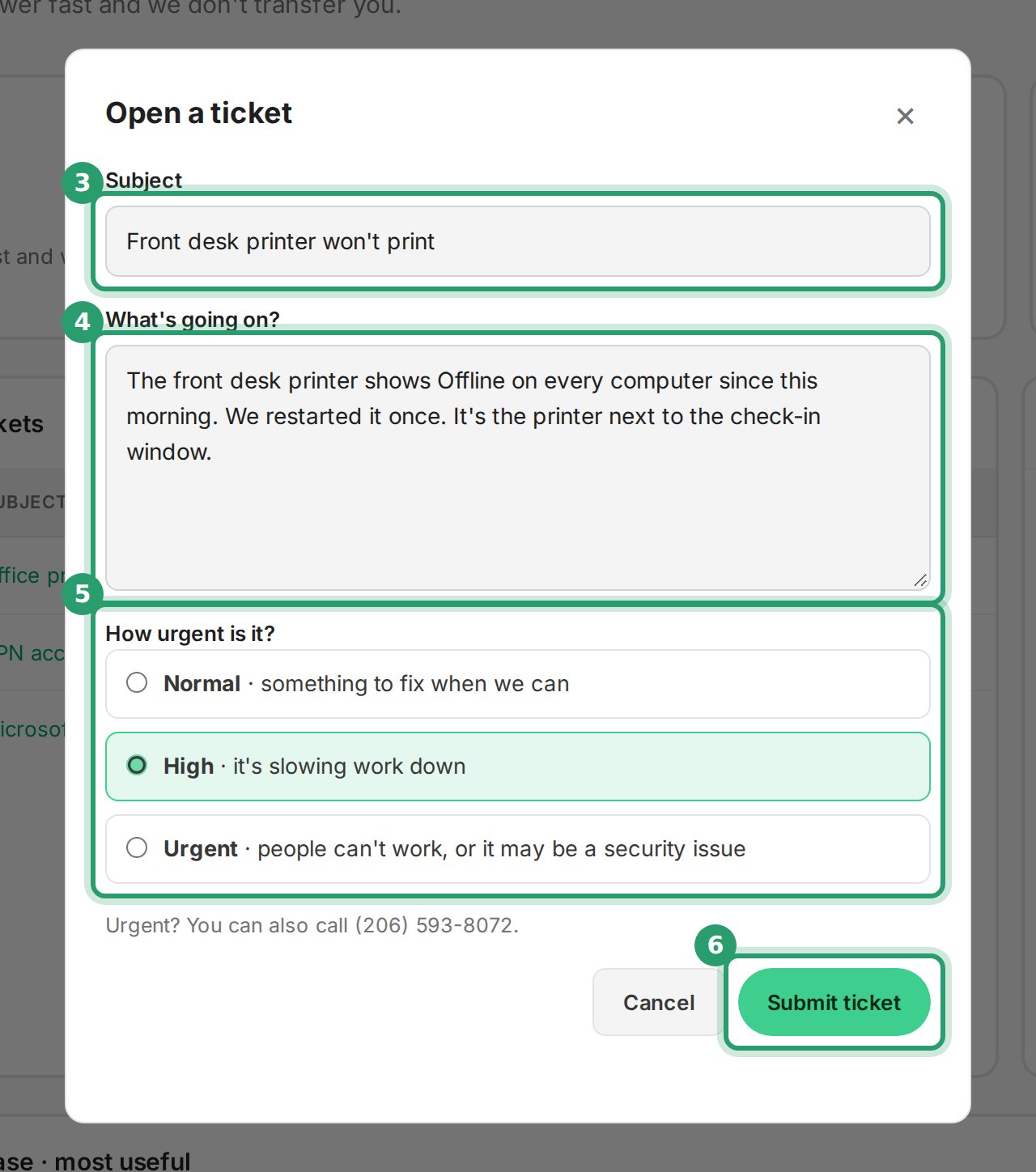
You'll know it worked when the form shows your new ticket number and then opens the ticket.
The portal form takes text only. To send a screenshot, reply to the confirmation email we send you and attach it.
¶ Open a ticket by email
- Write a new email to [email protected].
- Put a short summary of the problem in the subject line.
- Describe what happened, which computer, and what you already tried.
- Attach any screenshots or photos.
- Send the email.
You'll know it worked when you get a reply from us with your ticket number. To add more, reply to that email.
¶ What to include
You don't need all of these. Start with what you know.
| Detail | Example |
|---|---|
| Which computer | "The laptop at reception", or its name |
| Which person | One person, a team, or everyone |
| What you were trying to do | "Open Excel", "join the video call", "print a patient form" |
| What happened instead | The exact error message. A screenshot is better than a description |
| When it started | "This morning", "after yesterday's update", "since the new laptop arrived" |
| Who else is affected | Just you, one office, or everybody |
| What you already tried | "Restarted", "closed and reopened Outlook", "tried another browser" |
Never put a password in a ticket. If we need one, we arrange a secure way to share it.
¶ Choosing urgency
The portal asks How urgent is it? and gives three choices. Use the same words in an email if it isn't normal.
| Choice | Meaning |
|---|---|
| Normal | Something to fix when we can |
| High | It's slowing work down |
| Urgent | People can't work, or it may be a security issue |
Urgent? Call (206) 593-8072 as well as opening the ticket.
¶ Take a screenshot
A screenshot shows us the exact error. Attach it to an email, or reply to our email with it.
¶ Windows: Snipping Tool
- Press the Windows logo key + Shift + S.
- Drag the cursor around the part of the screen you want.
- Open the snip in Snipping Tool and press Ctrl + S to save it.
- Attach the saved file to your email.
You'll know it worked when the file you saved is attached to your email.
¶ Mac: capture part of the screen
- Press Shift, Command and 4 together, then let go.
- Drag the crosshair across the part of the screen you want.
- Release the mouse or trackpad button.
- Attach the file from your desktop to your email.
You'll know it worked when the screenshot file appears on your desktop.
If you can't take a screenshot, such as a startup or sign-in screen, take a photo with your phone instead.
¶ What happens next
- Confirmation: you get a reply with your ticket number.
- Triage: we check the urgency and pass the ticket to the right engineer.
- Response: an engineer replies by email and in the portal.
- Fix: we fix it, or agree a time with you.
- Closure: when it's fixed, we close the ticket. If the problem comes back, reply to our last email or open a new ticket.
¶ Follow your ticket in the portal
The Support page lists your company's open tickets. Select View all to see closed ones too.
- Open the ticket and type your message in the Reply box.
- Select Send reply.
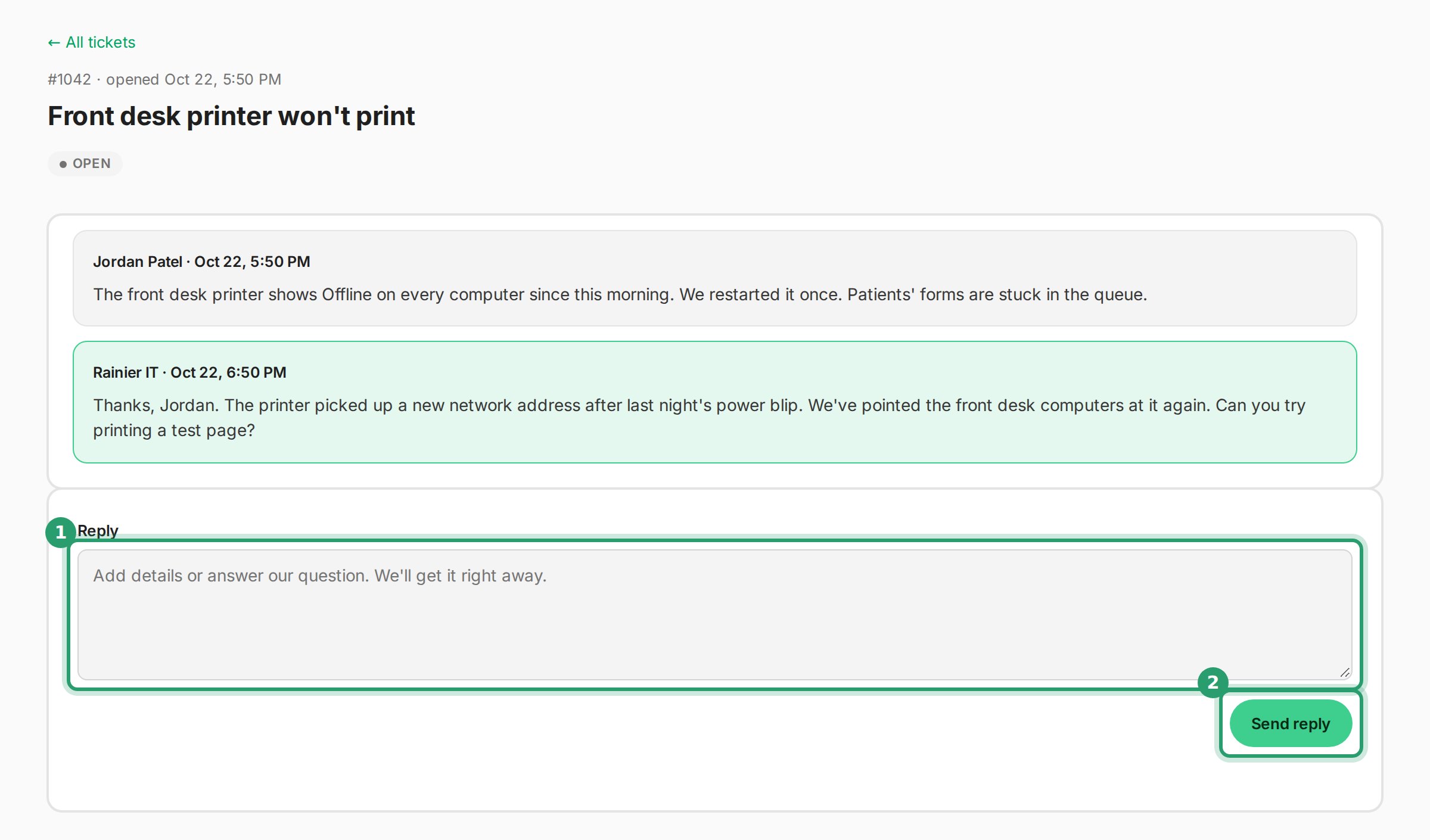
You'll know it worked when the portal shows Reply sent and your message joins the conversation.
¶ Common questions
¶ Replying by email adds to the same ticket
Reply to any email we send about a ticket. Your reply goes onto that ticket.
¶ Asking for a particular engineer
Say who you'd like to work with in the ticket and we do our best. In an emergency, let whoever answers help first.
¶ Copying in your team
People you copy (CC) on your email get copies of our replies when we reply to everyone on it. They aren't added as the person who opened the ticket, so if they have a problem of their own, ask them to open their own ticket.
¶ Opening the same ticket twice
No problem. Mention it in one of them and we merge them.
¶ Get help
| [email protected] | |
| Phone | (206) 593-8072 |
| Client Portal | portal.rainier-it.com |
| Hours | Monday to Friday, 8:00 AM to 6:00 PM Pacific Time |
¶ Sources
- Use Snipping Tool to capture screenshots, Microsoft Support
- Take a screenshot on Mac, Apple Support
- Work with Tickets: Reply all, Zammad User Documentation. About the tool: our ticket system runs on Zammad.
Last reviewed: October 2026