
A Mac gets Huntress from one Terminal command. Our Windows installer doesn't run on a Mac. If an MDM manages your Macs, it can install Huntress and give the approvals for you: see Deploy Huntress to Macs with an MDM.
¶ Before you begin
- A Mac on a macOS version Huntress supports. Huntress lists macOS 13 through 26. If you have a newer version, ask us first.
- An admin login on that Mac.
- Someone at the Mac to approve a few prompts. It takes a few minutes.
- Your company's two keys. If you ordered online, your shared folder has a file named
INSTALL-MAC.mdwith the command already filled in, and the Downloads page in the Client Portal points to it. Otherwise, email [email protected].
¶ Install on one Mac
-
Open Terminal. It's in Applications, in the Utilities folder.
-
Paste your company's command and press Return. It looks like this, with your keys in place of the capital letters:
curl -fsSL https://huntress.io/script/darwin/ACCOUNT_KEY -o /tmp/huntress-install.sh && sudo bash /tmp/huntress-install.sh -a ACCOUNT_KEY -o ORGANIZATION_KEY -
Enter the Mac's password when asked. Nothing shows as you type.
-
Wait for "The install was successful".
Please keep your command inside your company. It holds your keys.
¶ Approve Huntress
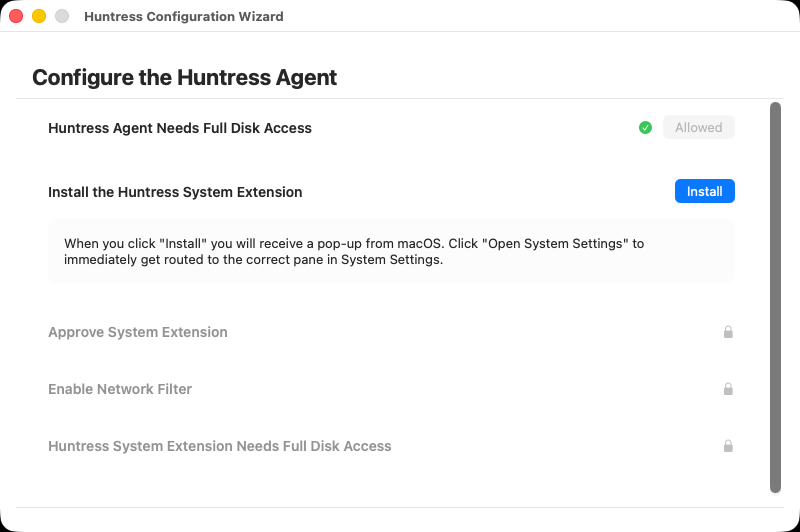
Huntress can't fully protect the Mac until these are approved. The Huntress Configuration Wizard should open on its own. If it doesn't, open Huntress from Applications. Select Next to see the list of approvals. Each one unlocks the next.
-
For "Huntress Agent Needs Full Disk Access", select Allow, then turn on the Huntress switch in System Settings.
-
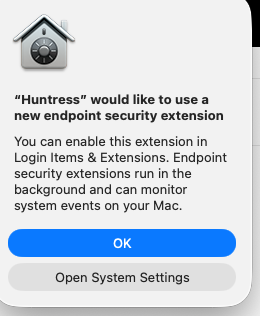
For "Install the Huntress System Extension", select Install. When macOS asks, select Open System Settings.
-
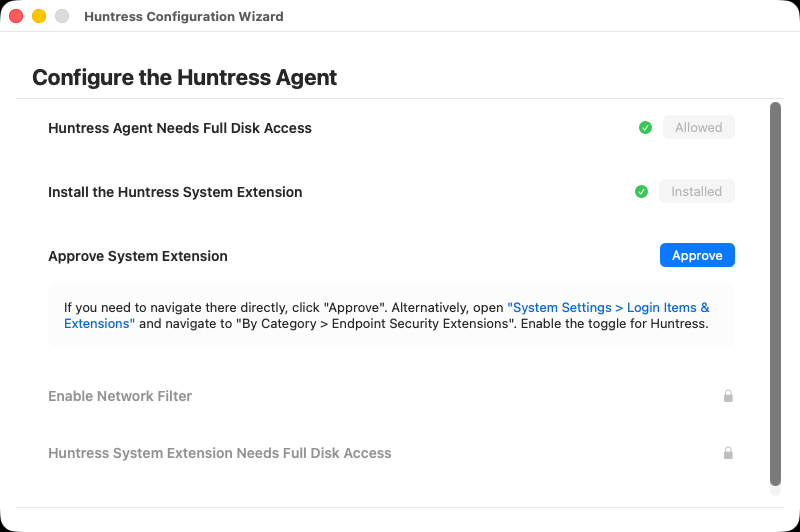
In System Settings, under Login Items & Extensions, go to By Category > Endpoint Security Extensions and turn on the Huntress switch. If you closed that window, select Approve in the wizard to get back to it.
-
For "Enable Network Filter", approve the filter when asked.
-
For "Huntress System Extension Needs Full Disk Access", select Allow, then turn on the Huntress System Extension switch in System Settings.
These screens are from macOS 26. On macOS 14 and older, the extension switch is under Details in System Settings.
¶ Check it's working
To see the agent's status, run this in Terminal:
sudo /Applications/Huntress.app/Contents/MacOS/Huntress status
The output should say the extension is installed, and Full Disk Access should be true for both the agent and the extension. If something looks wrong, email us a screenshot.
¶ Install with an MDM
If you use Mosyle, Jamf Pro, Microsoft Intune, Kandji or JumpCloud, it can install Huntress and give these approvals for you, so nobody has to select anything. See Deploy Huntress to Macs with an MDM. For Addigy, see Install via Addigy.
¶ Get help
Email [email protected] or call (206) 593-8072, Mon–Fri 8am–6pm PT.
¶ Sources
- Install the Huntress agent for macOS: critical steps, Huntress Support
- Huntress Configuration Wizard for macOS, Huntress Support
- Supported operating systems, Huntress Support
- Huntress macOS deployment scripts, Huntress on GitHub
Last reviewed: November 2026