Whether you're moving IT in-house, switching providers or closing down, this page explains what happens to your data and our tools when you leave. There are no cancellation fees.
| Your plan | What applies to you |
|---|---|
| Managed plan | Steps 1 to 6. Give 30 days' written notice. |
| Ordered online (self-serve) | Cancel from the portal any time (see "Self-serve: cancel from the portal"), then Steps 4 and 5. |
We never ask for your password by email or phone. Real links go only to sso.rainier-it.com or portal.rainier-it.com. If in doubt, call (206) 593-8072.
¶ Timeline at a glance
| When | What happens |
|---|---|
| Day you give notice | We confirm the request by phone with the account owner on file |
| Within a few days | Transition call, if you want one |
| Before your end date | We send the data export you asked for |
| Your end date (you choose it) | We remove our tools from your computers and turn off your portal sign-in |
| Within 30 days of the end date | We delete your data, apart from billing records |
¶ Step 1 (managed plan): Give notice
Managed plans are month to month. Either of us can end the plan with 30 days' written notice, and there is no early-termination fee. If you signed a separate agreement, check it for its own terms.
- Email [email protected] with the subject "Service termination" and your company name.
- Include your target end date and who is taking over IT: another provider, someone on your staff, or nobody because you're closing.
- Answer our call. Before anything is removed, we confirm the request by phone with the account owner on file.
You'll know it worked when we've called you and sent an email confirming your end date.
We act on a termination request only after that phone call. An email alone, even one that looks like it's from you, doesn't remove anything. That protects you from someone pretending to be you.
¶ Step 2 (managed plan): Transition call
We offer a short call to cover:
- the final invoice;
- the data you want exported;
- the date for removing our tools;
- loose ends: open tickets and planned work;
- handover notes for the next team: vendor contacts we set up and licences assigned to you.
If a new IT provider is coming in, we're happy to join a three-way call.
¶ Step 3: Data export
What we hold about your organisation is yours. Ask for it in your notice email or on the transition call.
You can ask for:
- an export of your tickets and device records (computers, hardware details and installed software), in a common format (CSV or JSON);
- copies of your invoices;
- the list of remote sessions on your computers;
- anything in your shared folder, which you can also download yourself from Files in the portal before your end date.
We send it through your shared folder or another way you agree, before your end date. If you ask after you've left, we respond within 30 days.
¶ Step 4: Removing our tools
You choose the date. On that date we remove our tools from each computer from our side:
- our monitoring agent and its remote support component;
- Huntress, if you have it;
- Action1, if you have it.
Before removing Action1, we turn Windows Update's own settings back on, because changes Action1 made to them stay after it's uninstalled unless they're reset first.
Huntress is protected against being uninstalled on the computer itself, so it has to be removed from our side. Ask us rather than trying to remove it yourself.
If a computer is off or away on that date, Huntress and Action1 remove themselves the next time it's online, and we finish removing our monitoring agent then too. If a computer won't come back online, tell us and we send you the steps for that computer.
Microsoft Defender stays on. Without our settings it goes back to Microsoft's defaults, so the computer is still protected; we just no longer watch it.
We don't remove:
- your files, or anything in user folders;
- programs you installed yourself;
- Windows user accounts.
You'll know it worked when the tools no longer appear in Settings, Apps, Installed apps on each computer.
¶ Step 5: Deleting your data
Within 30 days of your end date we delete:
- your tickets;
- your records in our monitoring, patching and billing systems, apart from billing records;
- your shared folder and the files in it;
- your Client Portal account and your Rainier IT sign-in.
| Data | How long we keep it after you leave |
|---|---|
| Tickets, device records, shared files, portal and sign-in accounts | Deleted within 30 days |
| Billing records (invoices and payments) | 7 years, for tax. No monitoring data |
| Device data held by Huntress and Action1 | Deleted on those vendors' own schedules |
Two exceptions:
- If we're helping investigate an active security incident, we keep what's needed until it's closed, then delete it and tell you.
- If the law requires us to keep something, we keep it for as long as required.
When deletion is done, we email you to confirm it.
¶ Step 6 (managed plan): After you leave
For 14 days after your end date we answer questions from your new IT team and send any documents we missed.
If you come back later, the tools install the same way as for a new client.
¶ Self-serve: cancel from the portal
You can cancel online security services at any time. Billing stops at the end of the month you've already paid for. There are no refunds for partial months. After you cancel, we remove our tools from your computers (Step 4) and delete your data (Step 5).
Sign in to the Client Portal first, then:
- Select Account in the menu.
- On the Payments & invoices card, select Billing.
- On the billing page that opens, select the option to cancel your subscription.
- Confirm the cancellation.
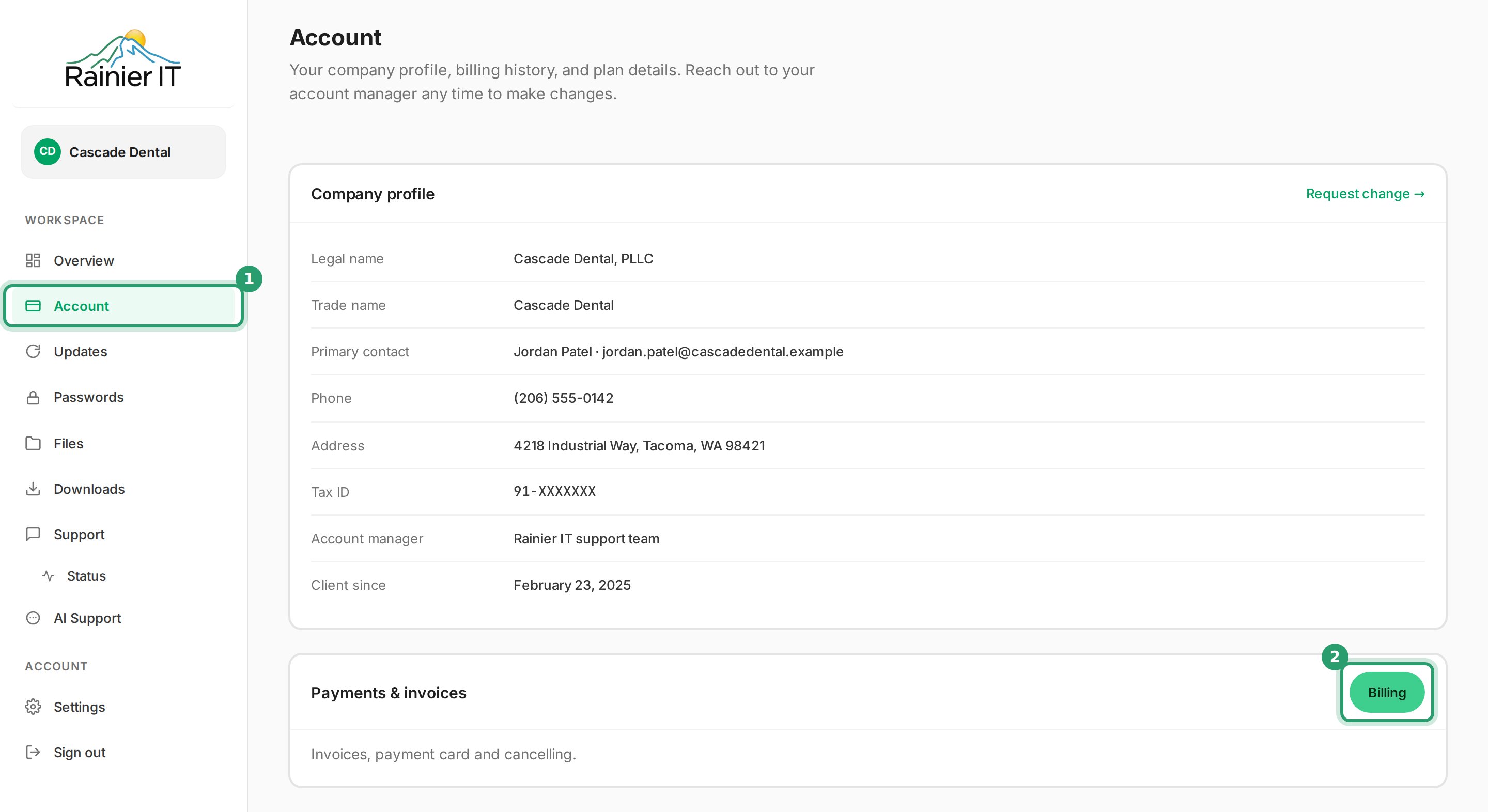
You'll know it worked when the billing page shows that your subscription ends at the end of the current month.
Only your company's portal admin sees Billing. Anyone else can cancel by emailing [email protected].
¶ Common questions
¶ Unpaid invoices
As our terms say, accounts more than 60 days past due may have service suspended.
¶ Ending on bad terms
The process is the same. We'd rather part cleanly, and deletion happens regardless.
¶ Your portal sign-in
It's turned off on your end date and deleted within 30 days.
¶ Offboarding contact
| [email protected] | |
| Phone | (206) 593-8072 |
| Hours | Monday to Friday, 8:00 AM to 6:00 PM Pacific |
¶ Sources
About the tools: our monitoring agent is TacticalRMM.
- Terms of service, Rainier IT (30 days' written notice, no early-termination fees, more than 60 days past due, self-serve cancelling)
- Privacy policy, Rainier IT (Huntress and Action1 delete device data on their own schedules)
- Agent Installation: Script for Full Agent Uninstall, Tactical RMM Documentation
- Uninstalling the Huntress Agent, Huntress Support (tamper protection; remote uninstall runs when the computer next checks in)
- Removing Action1, Action1 (Windows Update settings persist unless reset first; agents uninstall as soon as they connect)
- Add a cancellation page to the customer portal, Stripe Documentation
- How long should I keep records?, IRS (record periods of 3 to 7 years depending on the record)
Last reviewed: October 2026